
Защищенные мини ПК
Каждая модель PC4U имеет возможность применять наложенные средства защиты информации. Используется аппаратный модуль доверенной загрузки и аутентификации СЗИ Инспектор.
Персональный компьютер PC4U может использоваться для индивидуального домашнего и промышленного использования в коммерческих, государственных и образовательных учреждениях, там, где необходимы электронные вычисления и обработка информации.
Модельный ряд PC4U имеет системные блоки компактного размера и малого веса, что позволит не занимать много места на вашем рабочем столе. Забудьте о громоздких персональных компьютерах их эра уже заканчивается!
Модели PC4U на пассивном охлаждении имеет революционную систему пассивного охлаждения, которая обеспечит Вам комфортную работу в полной тишине.
Энергоэффективные модели PC4U имеют очень низкое энергопотребление, порядка 10 - 15 Вт/ч, что в 15 раз меньше, по сравнению с обычным персональным компьютером.
Модели PC4U построены на комплектующих последнего поколения, что позволяет с комфортом работать с графическими, вычислительными и ресурсоемкими приложениями.
При использовании энергоэффективного персонального компьютера PC4U срок окупаемости составляет 2,5 года благодаря экономии электроэнергии.
Благодаря отсутствию движущихся деталей, которые являются основным фактором выхода из строя персонального компьютера, срок службы PC4U С пассивным охлаждением составляет более 7 лет.
Модели PC4U зарекомендовали себя стабильной и эффективной работы.
Применяется собственная, запатентованная технология пассивного охлаждения.
Государственные учереждения могут приобрести модели PC4U из одного источника.
Каждая модель PC4U имеет возможность применять наложенные средства защиты информации. Используется аппаратный модуль доверенной загрузки и аутентификации СЗИ Инспектор.
Персональный компьютер PC4U предназначен для работы во многих сферах деятельности, начиная от домашнего использования и заканчивая применением в промышленных задачах.
Коммерция
Производство
Силовые структуры
Авиация
Недропользователи
Здравоохранение
Банки
Учебные заведения
Терминалы
Банкоматы
Информационные киоски
АСКУЭ
Выберите модель, которая соответствует вашим задачам
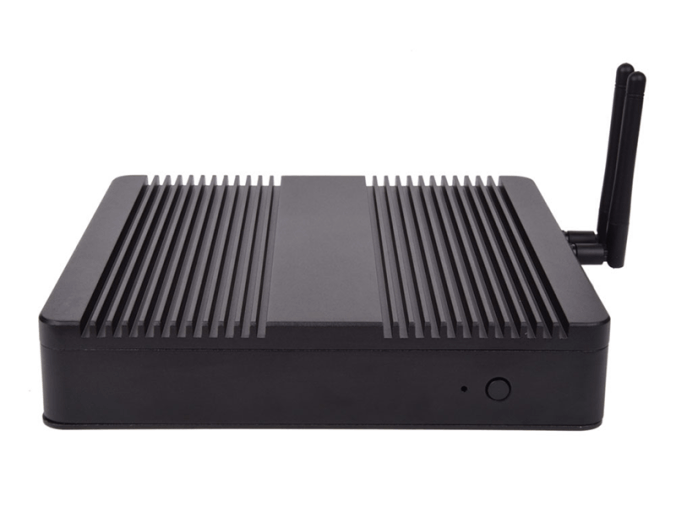
CPU: i3 6100u/7100u, i5 6200u/7200u
RAM: 2 - 16 Gb
HDD: 500 Gb - 4 Tb
SSD: 120 Gb - 1Tb
Крепление VESA
Пассивное охлаждение
Габариты: 198х198х40 мм
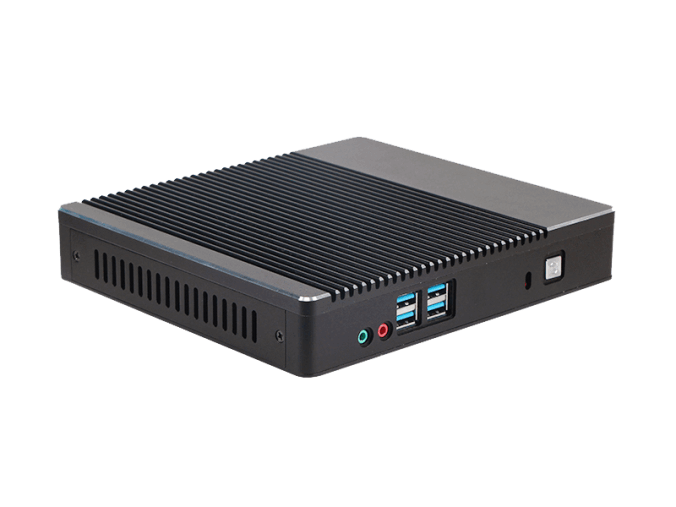
CPU: Intel Celeron, i3, i5, i7; AMD
RAM: 2 - 16 Gb
HDD: 500 Gb - 4 Tb
SSD: 120 Gb - 1Tb
Kensington Lock
Пассивное охлаждение
Габариты: 198х179х35 мм
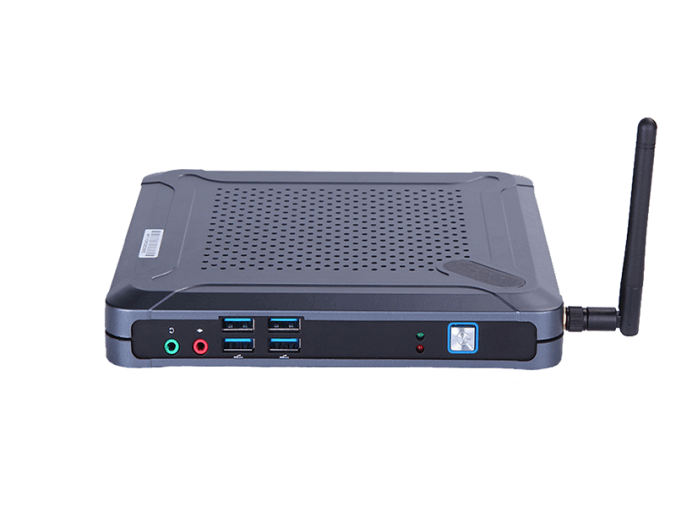
CPU: Intel Celeron, i3, i5, i7; AMD
RAM: 2 - 16 Gb
HDD: 500 Gb - 4 Tb
SSD: 120 Gb - 1Tb
Крепление на монитор
Габариты: 175х185х25 мм
Выберите модель, которая соответствует вашим задачам
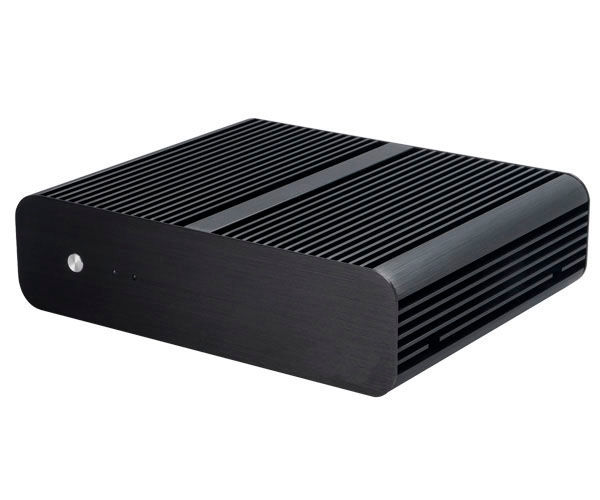
CPU: Intel Celeron, i3, i5, i7; AMD
RAM: 2 - 16 Gb
HDD: 500 Gb - 4 Tb
SSD: 120 Gb - 1Tb
Пассивное охлаждение
Габариты: 228х187х61,5 мм
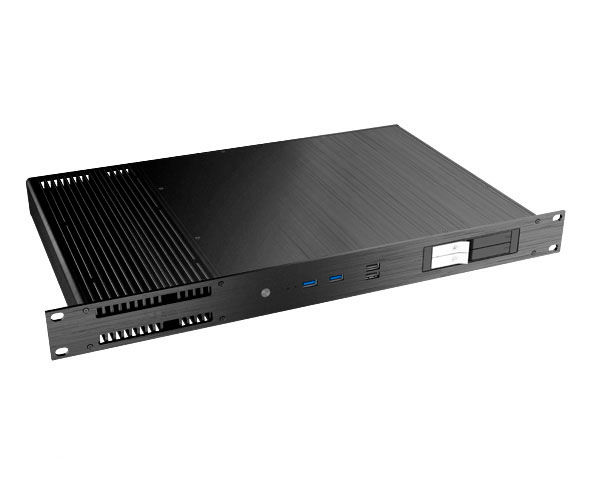
CPU: Intel Celeron, i3, i5, i7; AMD
RAM: 2 - 16 Gb
HDD: 500 Gb - 4 Tb
SSD: 120 Gb - 1Tb
Пассивное охлаждение
Kensington Lock
Крепление VESA
Габариты: 482,6х278х43,6 мм
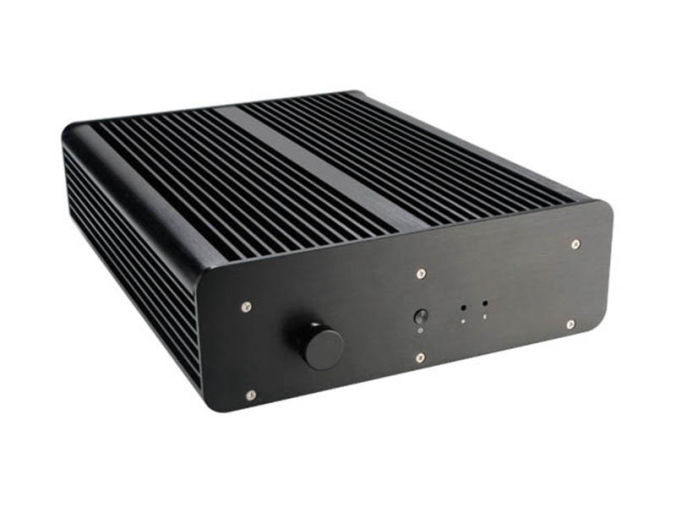
CPU: Intel Celeron, i3, i5, i7; AMD
RAM: 2 - 16 Gb
HDD: 500 Gb - 4 Tb
SSD: 120 Gb - 1Tb
Пыле - влагозащищенный
Пассивное охлаждение
Габариты: 235х308х76 мм
Выберите модель, которая соответствует вашим задачам
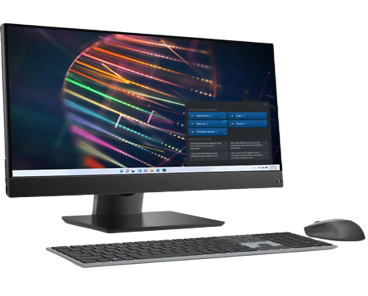
CPU: 4 ядерный процессор 11-го поколения; Тактовая частота/макс. тактовая частота 2.8/4.7GHz; Литография процессора 10hm; Кеш-память 12МБ;
RAM: тип памяти DDR4; Объем оперативной памяти 16Гб;
SSD: Объем твердотельного накопителя 512Гб;
Дисплей: Дисплей: 23.8" Разрешение Full HD 1080p (1920x1080), Антибликовое покрытие;
Особенности: Cетевой контроллер - 10/100/1000 Mb/s,
cтандарт Wi-Fi 802.11ac,
оптический привод DVD+R/RW&CD-R/RW,
звук встроенные динамики, встроенный микрофон,
встроенный виодеоадаптер, средства коммуникации LAN, WiFi, Bluetooth,
веб-камера, порты USB 2.0 - 1шт, порты USB 3.1 Gen 1-4шт,
блок питания 90Вт;
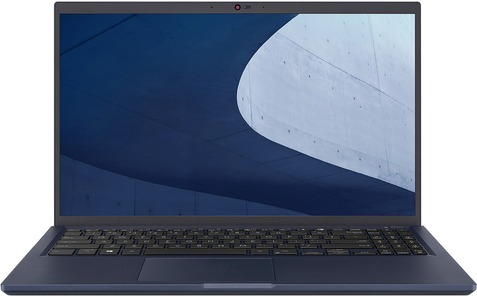
Артикул: 487PC01E
CPU: Pentium Gold/7505/2GHz
RAM:8Gb
HDD:-
SSD: M.2 PCIe 256Gb
Screen: 15,6"/1920x1080 full HD
Graphics: intel UHD/256mb
OC: Windows 10/Home
Габариты: 358x237x19 мм
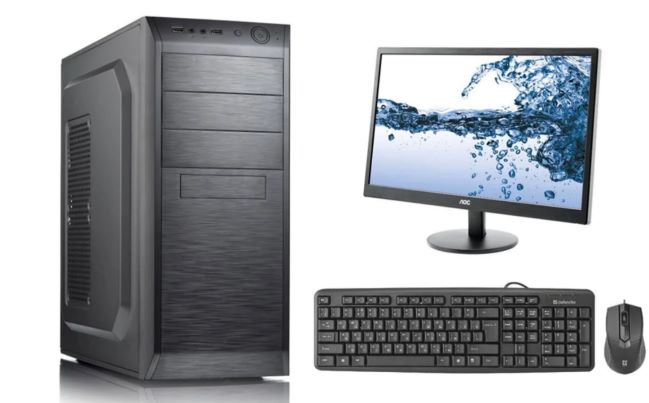
CPU: Процессор и частота процессора 12-го
поколения со встроенным
графическим адаптером
UHD-графика Intel 770
(тактовая частота 3,0 ГГц с
возможностью увеличения
до 4,6 ГГц, 18 Мбайт кэш памяти, 6 ядра, 12 потоков),
TDP не ниже 65W
RAM:8 ГБ DDR4 – 3200MHz
Hard drive: SSD 256GB M.2 PCIeNVMe, HDD 500GB 7200 RPM 2.5in
Монитор: Тип дисплея Матрица IPS со светодиодной подсветкой, входной сигнал Порт HDMI (HDCP 1.2), порт DisplayPort 1.2 , VGA
Диагональ (27 дюйма)
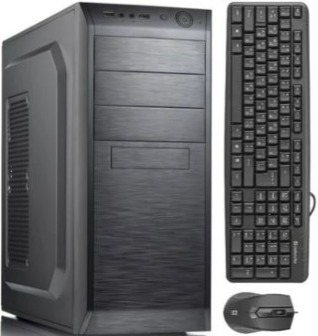
Описание тех. характеристик:
Процессор:Intel Core i5-12600K LGA1700, cash 20M, 2.80/3.70 GHz, 10(4+6)/16 Core Alder Lake, 125 (150) Вт;
Описание тех. характеристик:
Процессор:Intel i5-12600K LGA1700, 125(150)Вт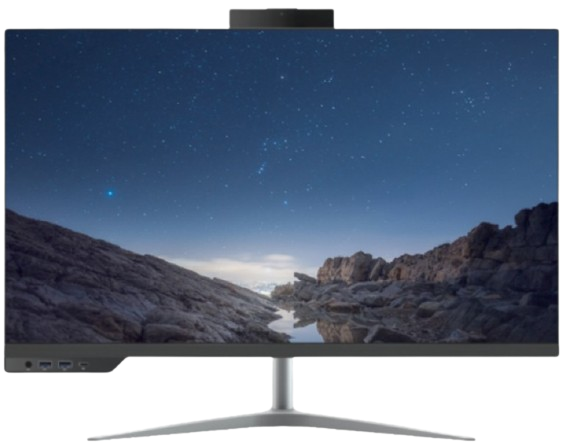
Описание тех. характеристик:
Процессор: i5-12400 LGA1700, оем, 18M, 2.50 GHz, 6/12 Core Alder Lake, 65 (117) Вт, UHD730;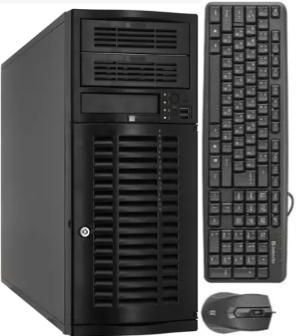
Описание тех. характеристик:
Процессор: Intel Xeon Processor W-2225 (4C 4.1GHz 4.6GHz Turbo HT 8.25MB 105W DDR4-2933)
Процессор:Core i7-13700 (8+8 Cores/30MB/24T/2.1GHz to 5.1GHz/65W)
Модуль памяти:16GB (1X16GB) DDR5 Non-ECC Memory
SSD: M.2 2230 256GB PCIe NVMe
Операционная система:Windows 11pro;
Дисплей: 23.8" FHD 1920X1080 Non Touch, 65W CPU, HDMI, FHD Camera, UMA, 160W Bronze PSU, WW;
Особенности: Intel Wi-Fi 6E (6GHz) AX211 2x2 Bluetooth 5.2 Wireless Card, Wireless Driver, Intel WiFi 6E AX211 2x2 (Gig+) + Bluetooth 5, Waves Maxx Audio
Комплект:Беспроводная стандартная клавиатура, беспроводная мышь, гарнитура;
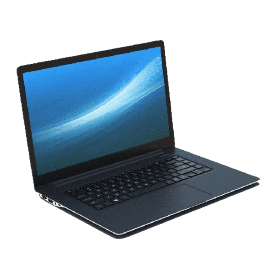
Процессор:13th Gen Intel® Core™ i7-1355U (12 MB cache, 10 cores, 12 threads, up to 5.00 GHz)
Оперативаня память:16GB, 8GBx2, DDR4, 2666MHz
SSD:512GB M.2 PCIe NVMe Solid State Drive
Экран: 15.6 inch FHD (1920 x 1080) 120Hz, матрица WVA
Графика: Intel(R) Iris(R) Xe Graphics
Oперационная система: Windows 11 Pro, English, Arabic, French, Russian, Turkish
Комплект: беспроводная мышь, сумка, зарядное устройство
Процессор:13th Generation Intel(R) Core(TM) i5-1335U (12 MB cache, 10 cores, up to 4.6 GHz)
Оперативная память:8 GB, 1 x 8 GB, DDR4, 3200 MT/s, single-channel, Non-ECC
SSD:M.2 2230 PCIe NVMe Gen4x4 256GB SSD Class 35
Экран:15.6" FHD (1920x1080) Non-Touch, AG, IPS, 250 nits, FHD Cam, WLAN
Графика:Встроенное графическое ядро;
Операционная система:Windows 11 Pro, English, Arabic, French, Russian, Turkish
Комплект:беспроводная мышь, сумка, зарядное устройство
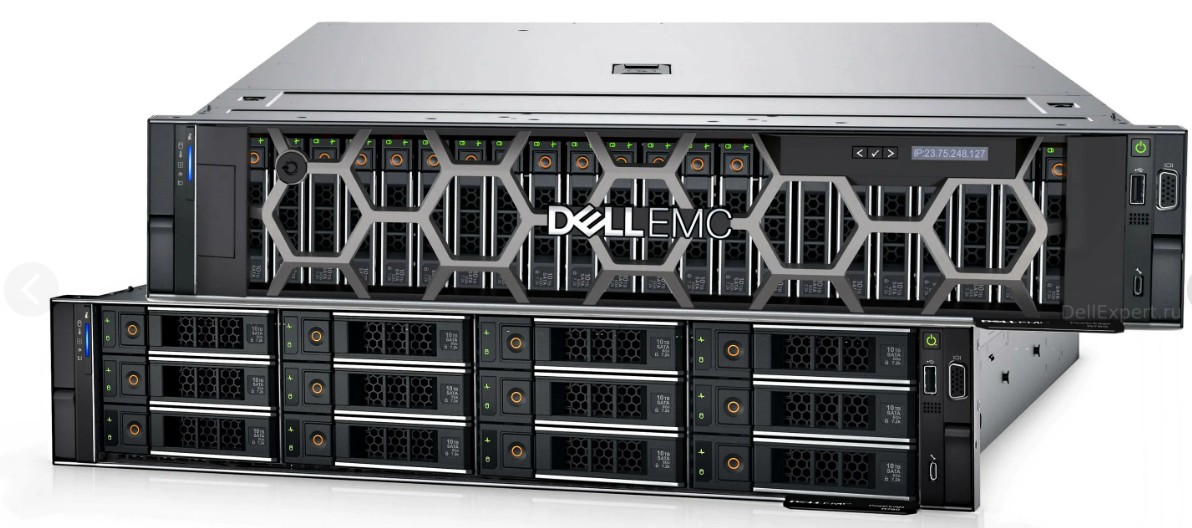
Процессор:Intel Xeon Gold 6326 2.9G, 16C/32T, 11.2GT/s, 24M Cache, Turbo, HT (185W)
Оперативная память:DDR4-3200 128 GB RDIMM, 3200MT/s
SSD:960GB SSD SATA Mix Use 6Gbps 512 2.5in Hot-plug AG Drive, 3 DWPD - 16 шт
Дополнительно:Dual, Hot-Plug, Power Supply, 1100W MM (100-240Vac) Titanium, Redundant (1+1) - 2шт
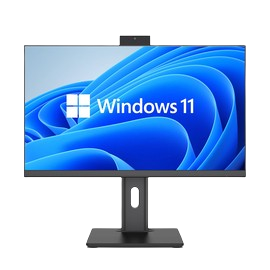
Процессор:Core i7-12650H
Модуль памяти:16GB, DDR4 3200MHz
SSD: 1TB NVMe PCIe Gen 3
Операционная система:Windows 11pro 64 Russian;
Дисплей: 23.8-27" 2560x1440 IPS
Порты: 5х USB3.1 Gen1 с поддержкой технологии подачи питания,1x RJ45, 1x DP-in или 1x DP-out; 1x HDMI; 1x USB 3.1 Type-C Gen1; 1x совмещенный порт микрофон/наушники (3,5 мм),универсальный аудиоразъем с CTIA
Особенности:Cлот для замка безопасности, Система физической безопасности корпуса, Bluetooth, Wifi, Камера.
Комплект: USB стандартная клавиатура и USB мышь, блок питание.
ㅤㅤ

Процессор:Core i7-12 поколения
Оперативаня память:16GB, DDR4 3200MHz
SSD:1TB NVMe PCIe Gen 3
Экран: 14-15.6 FHD IPS (1920 x 1080)
Графика: Встроенная
Порты:Порты: 2x USB 3.1 Gen1; 1x USB 3.1 Type-C Gen2 (с поддержкой DP и подачи питания); 1xHDMI; 1x RJ45;
Особенности:крепления для защиты
устройства. Wifi, Bluetooth, антибликовое покрытие, гигабитный сетевой контроллер, камера
Oперационная система: Windows 11 Pro 64 Russian
ㅤㅤ

Тех. характеристики:Двухконтроллерная система All-NVMe flash, 64-разрядный 6-ядерный процессор Intel Xeon, 32 ГБ ОЗУ по умолчанию (МАКС. 768 ГБ ОЗУ), 4 порта SFP+ по 10 Гбит/с, резервный источник питания, 4 слота для дополнительных хост-карт (слот 1 и слот 2: дополнительные хост-карты для 16 Гбит/с/32 Гбит/с Fibre Channel или 10 Гбит/с/25 Гбит/с iSCSI), комплект направляющих (SLR-RM3640), модуль C2F, программное обеспечение: операционная система XEVO, тонкое выделение ресурсов, моментальные снимки, клонирование, асинхронная удаленная репликация, синхронная удаленная репликация (опционально). 400 тыс. операций ввода-вывода в секунду/0,5 мс, 200 тыс. операций ввода-вывода в секунду/0,3 мс Модуль памяти DDR4 R-DIMM ECC 16 ГБ - 8 шт Хост-карта FC 32 Гбит x2 порта SFP28, с GBIC x 1 - 4 шт Оптический трансивер SFP28 32 Гбит 4 шт. +Коммутатор
Процессор:Intel Xeon Gold 6526Y 2.8G, 16C/32T, 20GT/s, 37.5M Cache, Turbo, HT (195W) DDR5-5200 x1
Intel Xeon Gold 6526Y 2.8G, 16C/32T, 20GT/s, 37.5M Cache, Turbo, HT (195W) DDR5-5200 x1
Оперативная память:64GB RDIMM, 5600MT/s, Dual Rank x12
SSD: 1.92TB SSD SAS, RI, up to 24Gbps 512e 2.5in Hot-Plug, AG Drive x2
Дополнительно:Dual, Redundant(1+1), Hot-Plug Power Supply,1100W MM(100- 240Vac) Titanium x1
Ссылка:pc4u.kz/product-server-standart-type1
Процессор:Intel Xeon Gold 6548Y+ 2.5G, 32C/64T, 20GT/s, 60M Cache, Turbo, HT (250W) DDR5-5200 x1,
Intel Xeon Gold 6548Y+ 2.5G, 32C/64T, 20GT/s, 60M Cache, Turbo, HT (250W) DDR5-5200 x1
Оперативная память:64GB RDIMM, 5600MT/s, Dual Rank x32
HDD:600GB Hard Drive SAS ISE 12Gbps 10k 512n 2.5in Hot-Plug x1
Дополнительно:Dual, Redundant(1+1),Hot-Plug PSU,1800W MM HLAC(ONLY FOR 200-240Vac)Titanium,C16 Connector x1
Ссылка: pc4u.kz/product-server-standart-type2
Процессор:Intel Xeon Silver 4510 2.4G, 12C/24T, 16GT/s, 30M Cache, Turbo, HT (150W) DDR5-4400 x1,
Intel Xeon Silver 4510 2.4G, 12C/24T, 16GT/s, 30M Cache, Turbo, HT (150W) DDR5-4400 x1
Оперативная память:64GB RDIMM, 5600MT/s, Dual Rank x4
SSD:1.92TB SSD SAS, RI, up to 24Gbps 512e 2.5in Hot-Plug, AG Drive x2
Дополнительно:Dual, Redundant(1+1), Hot-Plug Power Supply,1100W MM(100- 240Vac) Titanium x1
Ссылка:pc4u.kz/product-server-standart-type3
Процессор:Intel Xeon Gold 5416S 2G, 16C/32T, 16GT/s, 30M Cache, Turbo, HT (150W) DDR5-4400 x1,
Intel Xeon Gold 5416S 2G, 16C/32T, 16GT/s, 30M Cache, Turbo, HT (150W) DDR5-4400 x1
Оперативная память:32GB RDIMM, 5600MT/s, Dual Rank x8
HDD:600GB Hard Drive SAS ISE 12Gbps 10k 512n 2.5in Hot-Plug x1
Дополнительно:Dual, Redundant(1+1),Hot-Plug PSU,1800W MM HLAC(ONLY FOR 200-240Vac)Titanium,C16 Connector x1
Ссылка:pc4u.kz/product-server-standart-type4
Field of View (FOV) in astronomy is the angular extent of the sky visible through a telescope or captured by a camera sensor
. Whether you are framing a deep-space nebula or checking if a planet will fit in your eyepiece, a FOV calculator
is the essential bridge between your hardware's technical specs and the final visual result. Core Mathematics of FOV
The "hot" or most critical aspect of FOV calculation is the relationship between the focal length of your optics and the physical size of your For Astrophotography (Imaging Mode): The simple formula for small angles is: FOV (degrees) Sensor Dimension (mm) Focal Length (mm)
FOV (degrees) equals the fraction with numerator Sensor Dimension (mm) and denominator Focal Length (mm) end-fraction cross 57.3
To find the FOV for each individual pixel (image scale), use: . This tells you how much detail you can actually resolve. For Visual Observation:
The True Field of View (TFOV) depends on the eyepiece’s Apparent Field of View (AFOV) and the magnification: Eyepiece AFOV Magnification
TFOV equals the fraction with numerator Eyepiece AFOV and denominator Magnification end-fraction Magnification Telescope Focal Length Eyepiece Focal Length
Magnification equals the fraction with numerator Telescope Focal Length and denominator Eyepiece Focal Length end-fraction O'Reilly books Top FOV Calculators and Tools
Modern observers use web-based simulators to visualize their setup against specific celestial targets like the Andromeda Galaxy or the Moon. astronomy.tools Field of View Calculator - astronomy.tools
TFOV = (22 / 2032) x 57.3 = 0.62° (about 1.25x the width of the full moon).
This is the most linked tool on Reddit’s r/telescopes. Why is it “hot”?
Published by [Your Name/Team] | [Date]
One of the most common disappointments in astronomy isn’t bad weather—it’s looking through the eyepiece and realizing the object doesn’t fit. You expected the Andromeda Galaxy to fill the frame, but instead, you only see its bright core.
Enter the Astro FOV (Field of View) Calculator. This simple tool bridges the gap between a telescope’s specs and reality. Here is everything you need to know to use one effectively.
print(hot_fov(20, 600, 23.5)) # 2.24° print(hot_fov(35, 600, 23.5)) # 2.23° (notice the slight shrink)
This script proves that on a hot day, your telescope’s focal length actually increases, reducing your true FOV by fractions of a degree. For mosaic planning, this matters.
Ctrl + O to show a telescopic FOV circle on the sky.The keyword “astro FOV calculator hot” isn’t just about finding a tool on Google—it’s about understanding the thermal dynamics of your observatory. Whether you are chasing the Veil Nebula with a 100° eyepiece or calibrating a CMOS camera on a humid August night, the right calculator bridges the gap between theory and reality.
A hot calculator saves you from tiny, misframed galaxies and hours of ruined data due to thermal noise. Bookmark Astronomy.tools, update Stellarium, and always—always—measure your backfocus. Clear (and appropriately warm) skies.
Further Resources:
Have a “hot” tip we missed? Drop your favorite calculator in the discussion below.
Framing the Stars: Why Every Stargazer Needs an FOV Calculator astro+fov+calculator+hot
Ever pointed your telescope at a legendary nebula only to find it's so "zoomed in" you're looking at a blank patch of gas? Or worse, tried to capture the Andromeda Galaxy only for its majestic arms to be cut off by your camera's frame?
In both visual astronomy and astrophotography, Field of View (FOV) is everything. It determines exactly how much of the sky you can see through your gear. Instead of relying on trial and error in the cold, a field of view calculator is your best friend for planning the perfect night. The Tools of the Trade
While you can do the math yourself, several "hot" online tools make this process instantaneous.
astronomy.tools: A community favorite that lets you simulate different telescope, camera, and eyepiece combinations. It even offers a "CCD Suitability" mode to ensure your camera and scope are a good match for your local seeing conditions.
Telescopius: This simulator is highly visual, allowing you to search for specific deep-sky targets and see exactly how they will fit into your frame.
Stellarium: While primarily a planetarium app, its "Oculars" plugin is a powerhouse for simulating FOV directly on a live star map.
FOV Astro: A newer session planner that includes advanced features like satellite transit overlays, showing you if a satellite might streak through your shot during your planned exposure. The Secret Sauce: How It's Calculated
If you're curious about the "how" behind the "hot" calculators, it comes down to a few key variables:
It looks like you're searching for a tool to calculate field of view (FOV) for astrophotography or astronomy, with "hot" perhaps meaning popular or currently recommended.
Here's a clear text summary to match your query:
Popular Astro FOV Calculators (no clickbait, just names):
To use one (example with astronomy.tools):
Quick formula (no calculator):
FOV (degrees) = (sensor width in mm / telescope focal length in mm) × 57.3
For arcmin, multiply result by 60.
Elias stared at the glowing screen of his laptop, the blue light reflecting off his fogged-up glasses. The temperature on the ridge had plummeted to five degrees, but his sensor was running "hot"—a thermal warning flashing red on his capture software.
"Not now," he whispered, his breath blooming in the frozen air.
He was chasing the Dragon’s Eye Nebula, a target that only cleared the jagged peaks of the Blackwood Range for forty-five minutes once every decade. He had his telescope—a custom triplet refractor—and his dedicated cooled CMOS camera. But in his rush to set up, he realized he’d forgotten to swap the focal reducer.
He needed to know if the nebula would actually fit in his current frame, or if he was about to spend his forty-five minutes photographing empty black space.
He pulled up his Astro FOV Calculator. The interface was "hot" too—a beta version he’d been tweaking that used real-time plate solving. He punched in the coordinates: Focal Length: 600mm Sensor Size: APS-C Target: NGC 6543 (The Eye) The calculator spun. A yellow box appeared over a star map.
"Too tight," Elias hissed. The edges of the nebula’s faint outer halo were bleeding off the sensor. If he didn't adjust his framing now, the "Eye" would look like a squint.
He jumped to the mount, his fingers numb as he loosened the clutch. Guided by the calculator's live FOV overlay on his tablet, he nudged the telescope three millimeters to the left. He locked it down just as the nebula’s leading edge rose above the granite ridge. Field of View (FOV) in astronomy is the
The sensor temperature stabilized. The "hot" warning faded to a steady green. Elias hit Start Sequence.
As the first 300-second exposure crawled across the screen, the Dragon’s Eye appeared—perfectly centered, every wisp of ionized gas captured within the calculated frame. He leaned back against his frozen SUV, looking up at the silent, shivering stars. The math had held. The shot was safe.
stared at the screen, the blue light reflecting in his tired eyes as he toggled between tabs on astronomy.tools
. Outside, the desert air was finally cooling, but his gear was still "hot"—thermal noise from a long day in the sun meant his sensor wouldn't be ready for hours. He needed to find the perfect target for tonight’s "hot" streak of clear skies. He pulled up the Field of View (FOV) Calculator
to see how the North America Nebula would frame through his 80mm refractor. He typed in the specs: a 480mm focal length paired with his ZWO ASI2600MC camera.
"Too tight," he muttered, watching the red rectangle overlap the nebula's 'Cygnus Wall.' He adjusted the settings, adding a 0.8x reducer to widen the view. The calculator instantly updated, showing a sprawling 2.8° x 1.9° FOV. Perfect.
But there was a catch. His camera sensor was still cooling down from its "hot" state. Using a suitability calculator
, he checked his pixel scale. At 1.63 arcseconds per pixel, he was right in the "sweet spot" for his local seeing conditions—not too sampled, not too square. The plan was set: : The North America Nebula (NGC 7000). : 80mm scope + 0.8x Reducer.
: Landscape orientation to capture the "Gulf of Mexico" region.
As the desert heat finally dissipated, Leo watched the "hot" pixels on his preview screen fade away, replaced by the icy, sharp points of a billion distant suns. The math was done; now, it was time to let the photons fall. specific telescope and camera combinations to see how they frame your favorite nebula?
The string of keywords astro+fov+calculator+hot sounds like a bizarre late-night internet search history, but it actually tells the compact, neon-lit story of a breakthrough moment in astrophotography.
Here is that story.
It was 2:00 AM in the Atacama Desert, the air so thin and cold it felt like breathing glass. Leo sat hunched inside his makeshift observatory—a converted shipping container—rubbing his hands together for warmth.
ASTRO The sky outside was suffocatingly vast. For an astrophotographer, the cosmos is a cruel lover: it offers infinite beauty but demands infinite precision. Leo was hunting the "Ghost of Jupiter," a planetary nebula that was notoriously difficult to frame. He had flown 5,000 miles for three nights of clear skies, and this was his last chance. He had his camera, his tracker, and his telescope, but he was missing one crucial variable.
FOV Field of View. It’s the golden metric. It dictates how much sky your telescope sees. Too narrow, and you clip the edges of the nebula, ruining the composition. Too wide, and the object becomes a tiny, featureless smudge in a sea of black.
Leo had swapped his telescope at the last minute, trading a wide-field refractor for a high-magnification Newtonian reflector. He was paralyzed by a sudden, crushing wave of math anxiety. He needed to know exactly what the sensor would see before he spent six hours taking exposures.
CALCULATOR He scrambled for his laptop, the screen glare stinging his tired eyes. He typed frantically into the search bar, his fingers clumsy from the chill: astro fov calculator.
The results were dry, utilitarian websites. Angular field calculators. Sensor size databases. He began punching in numbers: Focal length: 1000mm. Sensor width: 23.5mm. Pixel pitch: 3.76µm.
He hit enter. The software rendered a black box overlaid on a star chart. It was a calculator that showed the simulated view. The box was tight. Dangerously tight. It showed him that with this telescope, he wouldn’t capture the nebula’s outer shell—the part that gave it the "Ghost" nickname. He would just get the core.
He groaned. He had the wrong gear. He was going to miss the shot. He had failed.
HOT Then, he remembered the "Hot" pixel trick. Step 2: Calculate manually (or let the tool
Desperate, he uncapped the lens, covered the objective with a dark cloth to block all light, and cranked the ISO to maximum. He took a long exposure. On the screen, the image appeared pitch black, but then, he applied a simple levels adjustment.
Suddenly, the screen lit up. Not with stars, but with "hot pixels"—tiny, bright, multi-colored dots scattered across the sensor. They were usually noise, a nuisance. But tonight, they were a map.
Leo opened his planetarium software (Stellarium) and overlaid the image. The hot pixels acted as a dummy star field, showing him exactly how his sensor was oriented relative to the sky. He realized the calculator had been wrong—or rather, he had misjudged the spacing of his field flattener.
By analyzing the distribution of the "hot" noise, he realized his actual Field of View was slightly wider than the calculator predicted due to the flattener's effect.
He didn’t need to switch telescopes. He just needed to rotate the camera 45 degrees.
He adjusted the rotation ring, locked it down, and began his exposure sequence. Six hours later, as the sun began to bleach the horizon pink, he looked at the final integration.
There it was. The Ghost of Jupiter, perfectly framed. The outer halo was ethereal and blue, the core sharp and bright. It was a masterpiece.
The calculator had given him the theory, but the "hot" pixels had given him the truth.
To calculate your astronomical Field of View (FOV) effectively, you can use online interactive tools or manual formulas. This guide covers the best "hot" tools and the math behind them to ensure your targets fit perfectly in your frame. 1. Top Online FOV Calculators
The following interactive tools are the most popular ("hot") for visualizing how a specific object (like a galaxy or nebula) will look through your equipment:
Astronomy Tools Field of View Calculator: The industry standard. It allows you to select your telescope and camera from a database, choose a target (e.g., Messier 31), and see a visual framing box.
Sky at Night Magazine Calculator: A user-friendly tool provided by David Campbell that functions similarly to Astronomy Tools, ideal for beginners to quickly check equipment compatibility.
Stellarium (Oculars Plugin): A free desktop planetarium. You can input your DSLR/CCD sensor and lens specs in the "Oculars" plugin settings to simulate a live FOV against the entire night sky. 2. Manual FOV Calculations
If you prefer to calculate it yourself or use a custom setup, use these formulas:
For Imaging (Astrophotography):The FOV depends on your sensor size and focal length. Formula: Steps: Find your camera's sensor width and height in millimeters. Divide each dimension by your telescope's focal length. Multiply by to convert from radians to degrees.
For Visual Observation:This determines the "True Field of View" (TFoV) you see through an eyepiece.
Field of view calculator for telescopes and eyepieces - Facebook
Originally for CCD cameras, but updated for modern CMOS sensors. It is less pretty than Astronomy.tools, but it is “hot” because it calculates thermal drift – how long until your sensor overheats and needs a cooling cycle.
Pro Tip: If your camera lacks active cooling (like a stock DSLR), CCDCalc will tell you your maximum exposure before “hot” noise ruins your sub-frame.
Not all calculators are created equal. Here are the three most popular (and thermally aware) tools that are trending.