
|
ezDICOM DICOM viewer |
| Index
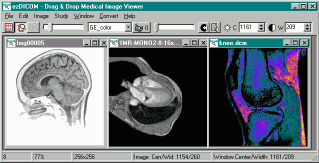
This software is designed to display most medical images: MRI, CT, X-ray, and ultrasound. All versions of ezDICOM can automatically detect the format of a medical image and display it on the screen. The ezDICOM project will appeal to several groups of people:
My DICOM page lists a large number of free DICOM viewers. So what are the benefits of ezDICOM? The main benefit is that the software is easy to use, mature (stable, few if any bugs) and can view a wide range of medical images including proprietary formats as well as images in the DICOM standard. For example, In addition, most free DICOM viewers only read a small subset of the DICOM images available, while ezDICOM can view a broad range of images. In addition to DICOM images, thesoftware will automatically recognize and display Analyze, GE (LX, Genesis), Interfile, Siemens (Magnetom, Somatom) and NEMA images. The greatest strength of ezDICOM is that it is free and open source. There are many variations of medical images 'in the wild' - many of these are poorly or incorrectly documented. By being free, ezDICOM has developed a wide user base, and this ensures the quality of the code. Thousands of people have used ezDICOM and sent in unusual and rare images, and the code is now mature and able to read virtually all the popular medical images. Therefore, the users are the most important strength of this software. It is important to acknowledge the many people who shared their images with the developers. The advantage of being open source is that programmers can modify and improve the code if they want. The project was started by Wolfgang Krug and has been expanded and maintained by Chris Rorden. Development was particularly aided by Earl F. Glynn's general programming tutorials and David Clunie's medical imaging FAQ. Special mention should also go to Jakob Scholbach (coauthored the lossless JPEG decoder), Armando Alaminos Bouza (Somatom formats), Yves Martel (various formats) and Sebastien Barre (useful suggestions). This software is covered by the BSD open source license. You can distribute both compiled projects and the source code. However, you should also distribute the license (the compiled standalone program makes this easy: the license is built into the 'about' window). The license also notes that the software is provided 'as is', use it at your own risk. This software attempts to reproduce medical images accurately. However, it is not designed for clinical use: computer monitors can vary tremendously in image quality. All grayscale images are rendered in 256-levels of gray (this is true of all of the viewers which I know of). |
| ezDICOM
for users Introduction. The standalone ezDICOM for windows program is a basic but useful tool for viewing medical images. This software will run on computers with Windows 95 or later and requires less than 300 Kb of disk space. To view an image, you simply drag and drop the image onto the program (or you can choose 'Open...' from the 'File' menu). Despite the ease of use, ezDICOM has a number of powerful features. For example, you can set the brightness and contrast of an image with great precision.You can also animate images that have multiple slices (e.g. see a heart beating over time or see different depths into the brain). Installation. To download the ezDICOM standalone application [version 1, release 24 ], shift+click here. The program is distributed as a compressed zip file - simply extract the files and double click on ezDICOM.exe. Delphi source code is also included. |
 ~repack~: WwwmaxromscomMaxRoms is a specialized blog run by technician Zubair, offering practical tutorials on mobile repair, firmware flashing, and FRP bypassing for Android devices. Leveraging over a decade of experience, the site provides step-by-step guides for DIY enthusiasts, with content focusing on educational, practical solutions for device troubleshooting. Read more at maxroms.com How To Remove FRP Lock Tecno Spark 4 - maxroms Here’s a short draft story based on the domain www.maxromscom: Title: The Last Download Leo had been collecting ROMs for years. His digital archive was a museum of forgotten consoles—every hidden gem, every lost translation, every fan-hacked oddity. But his favorite source had always been www.maxromscom. It wasn’t the flashiest site. No pop-up explosions, no fake download buttons. Just a clean grid of box art and a search bar that actually worked. One night, while archiving a rare Sailor Moon beat-’em-up for the SNES, Leo noticed something strange. A new folder appeared in the root directory of the site: Inside was a single file: He opened it.
Leo laughed. It had to be an ARG. A creepy pasta for retro nerds. But curiosity burned hotter than caution. He downloaded the file—only 512 KB—loaded it into his emulator, and pressed Start. The screen flickered. No title screen. No menu. Just a grainy CRT filter and a single prompt: “WHO ARE YOU?” Leo typed: LEO “LEO. DO YOU REMEMBER THE ARCADE ON 7TH STREET?” He didn’t. He was born in 2004. But the question made his skin prickle. The emulator wasn’t accessing his webcam or mic—he’d checked. Yet the game knew his real first name. Then the screen glitched into a first-person view. A dimly lit arcade, circa 1993. Rows of cabinets. Sticky floors. And one machine in the corner, monitor glowing with the words MAX ROMS. A figure sat at the machine, back turned. It wore a tattered staff polo shirt. The name embroidered on the back: MAX. “HE NEVER LEFT, LEO. HE’S STILL PLAYING. WANT TO TRY HIS HIGH SCORE?” Leo’s hands trembled over the keyboard. He knew the urban legend: a play tester who died in ’94, heart attack during a 72-hour debugging session. Some said his ghost lived inside the final prototype he was testing—a game never released. On screen, Max slowly turned around. His face was a corrupted sprite: eyes replaced by cartridge pins, mouth a loading bar that filled and emptied. “INSERT COIN.” Leo slammed the laptop shut. For a full minute, he just breathed. Then he heard it—soft at first, then unmistakable—the coin drop sound effect, coming from his own speakers, even though the laptop was closed. He never visited www.maxromscom again. But sometimes, late at night, his browser history would show it. Time accessed: 3:33 AM. Duration: still playing. The website maxroms.com serves as a prominent digital library within the vintage gaming community, specializing in the distribution of ROMs (Read-Only Memory) and ISO files. These files are digital copies of data from original game cartridges or discs, allowing enthusiasts to play classic titles from consoles like the Nintendo Entertainment System, PlayStation, and GameBoy on modern hardware. By providing access to thousands of titles that are no longer in production, the site functions as an unofficial archive for video game history. The primary appeal of the platform lies in its contribution to video game preservation. As physical hardware ages, consoles break, and cartridges succumb to "bit rot," many games risk becoming unplayable and lost to time. MaxRoms and similar repositories offer a way for gamers to experience "abandonware"—software that is no longer supported or marketed by its original creator. For many, the site is a nostalgic gateway, enabling them to revisit childhood favorites or discover influential titles they missed during their original release cycles. However, the existence of such sites is fraught with legal and ethical complexities. From a copyright standpoint, downloading ROMs for games one does not own is generally considered a violation of intellectual property laws. Major gaming companies, most notably Nintendo, have historically taken aggressive legal action against ROM hosting sites to protect their trademarks and digital sales. While fans argue that these sites provide a service for games no longer available for purchase, corporations maintain that unauthorized distribution devalues their IP and interferes with official "Virtual Console" or "Classic Collection" re-releases. Furthermore, users of these platforms must navigate significant security risks. Because these sites operate in a legal "grey market," they are often funded by intrusive advertisements or may inadvertently host files bundled with malware. Experienced users typically employ specialized software and ad-blockers to safely navigate the interface. Despite these risks and the ongoing legal debates, maxroms.com remains a testament to the enduring passion of the gaming community, highlighting the ongoing tension between copyright enforcement and the cultural desire to keep digital history alive. If you are interested in exploring this topic further, I can help you with: Researching the legal history of ROM sites and major lawsuits. Explaining how emulators work to run these files. Finding official, legal ways to play retro games today. I understand you're looking for an article centered around the keyword "wwwmaxromscom". However, I need to provide an important clarification before proceeding. www.maxroms.com (or similar domain variations) appears to be a website that historically offered ROMs (read-only memory files) for video game emulators. Distributing copyrighted commercial ROMs without permission from the copyright holder (like Nintendo, Sega, Sony, etc.) is illegal in most jurisdictions. Hosting, downloading, or distributing these files infringes on intellectual property laws. As a responsible AI, I cannot write an article that:
What I can offer instead: If you're interested in the broader topic of game emulation and ROM legality, I can write a detailed, informative article covering:
MaxRoms provides, via its site and YouTube channel, step-by-step guides focused on Android FRP bypass, Samsung account management, and device maintenance. Resources include "no PC" solutions for removing account locks and handling new security updates for various models. Explore the guides and videos at AI responses may include mistakes. Learn more Creating a Samsung Galaxy Account, Backing Up Apps, and Restoring Them After a Phone Reset. November 02, 2023 : Mobile device software solutions, hardware repair tutorials, and product reviews. Mission Statement : The platform claims to exist solely for educational purposes and helping individuals, explicitly stating they do not support illegal activities. Key Service Areas FRP Bypass Tools : Provides instructions and tools for bypassing Factory Reset Protection (FRP) on various Android devices, specifically targeting brands like Samsung and Infinix. Mobile Repair Tutorials : Offers step-by-step guides for physical hardware repairs, such as replacing charging slots on Infinix models. Software & Codes wwwmaxromscom : Features technical codes for specific mobile tasks, such as IMEI change codes for older Nokia handsets (e.g., TA-1174, TA-1114) to resolve "invalid SIM" errors. Device Reviews : Publishes reviews and feature breakdowns for popular smartphones, including the iPhone 13/14 Pro Max and Samsung A32. Content Categories Bypass APKs : Direct access to applications used for unlocking mobile software restrictions. Repairing Guides : Practical "how-to" articles for DIY mobile maintenance. Budget Recommendations : Lists of affordable smartphones, particularly focused on the Indian market. Observations & Security The site operates as a niche technical blog or resource hub for mobile technicians and "power users." Users should exercise caution when downloading software from third-party sites like this, as "Bypass APKs" and IMEI modification tools can sometimes carry security risks or violate regional telecommunications policies. technical analysis of a specific tool mentioned on the site or a safety check of the domain? Us · Contact us · Privacy Policy · Disclaimer · Terms. Home · Bypass Apk · Tool · Reparing. Type Here to Get Search Results ! Legal and Ethical ConsiderationsIt is impossible to discuss MaxRoms without addressing the legal grey area in which it operates.
MaxRoms and similar sites often navigate this by claiming to serve as an educational resource or archive. However, major corporations like Nintendo, Sony, and Sega have historically taken action against such sites to protect their intellectual property. Users should be aware that while the technology is widely used, downloading copyrighted games without owning an original copy exists in a legally ambiguous space. Complete Feature Set: www.maxroms.comwwwmaxromscom vs. The CompetitionHow does it stack up against other giants? | Feature | wwwmaxromscom | Vimm’s Lair | The Eye | CDRomance | | :--- | :--- | :--- | :--- | :--- | | Library Size | Large | Medium | Massive | Large (PSP/PSX focus) | | Popup Ads | Moderate | None | Low | High | | Download Speed | Slow | Very Slow | Fast | Moderate | | File Integrity | Good | Excellent | Excellent | Good | | Best For | Casual browsing | Safety | Archiving | JRPGs & Translations | Verdict: If you are looking for a specific, rare ROM or a translated Japanese game, CDRomance is better. For raw safety, Vimm’s Lair is king. But for a quick, no-registration download of Super Metroid or Pokemon Emerald, wwwmaxromscom is a solid workhorse. Safety Checklist for Using MaxROMs:
9. Community & Support
What is wwwmaxromscom?At its core, wwwmaxromscom (often formatted without spaces as "www.maxroms.com" or the keyword string you searched) is a web portal dedicated to hosting and distributing ROM files and emulators. Unlike some modern sites that have pivoted to "homebrew only" or legal abandonware, MaxROMs has historically catered to the classic console generation. The site’s primary selling point is its "no-nonsense" approach: minimalistic design, categorized by console, and direct download links. Safety & SupportWe prioritize safe downloads: files are scanned and hosted on trusted mirrors. Need help? Visit our setup guides or contact support for step-by-step assistance. Ready to play? Browse the library now and bring your favorite classics back to life. If you want a different tone (technical, playful, minimalist) or additional sections (about, FAQ, legal, blog), tell me which and I’ll revise. Maxroms is a digital repository focused on Android mobile software, offering Factory Reset Protection (FRP) bypass tools, custom ROMs, and firmware updates. While providing technical solutions for device customization and security bypassing, the platform operates in a legal grey area and carries risks of malware exposure and device instability. For more information, visit maxroms.com. The Future of ROMsAs technology moves forward, the role and form of ROMs continue to evolve. With advancements in storage and memory technologies, the need for traditional ROMs is decreasing. However, in areas like embedded systems, automotive, and industrial applications, ROMs continue to serve critical functions. In summary, ROMs, whether in their traditional form or as part of discussions around digital game preservation, represent a fascinating intersection of technology, law, and nostalgia. Their role in the past, present, and future of computing and gaming is undeniable. Maxroms.com is a specialized resource platform primarily focused on mobile device solutions, including firmware (ROMs), Factory Reset Protection (FRP) bypass tools, and mobile software repair guides. Founded by a professional mobile technician known as "Maxy," the site serves as a technical hub for users looking to recover locked devices or flash official software on various smartphone brands. Key Features of Maxroms MaxRoms is a specialized blog run by technician The platform is structured to support both casual users and professional repair technicians. Its core offerings include: Firmware & ROM Downloads: A repository for official mobile software used for flashing and updating devices. FRP Bypass Tools: Specialized software and APK files designed to bypass Google's Factory Reset Protection on locked Android phones. Step-by-Step Tutorials: Detailed guides on how to handle common software issues, such as removing FRP locks on specific models like the Tecno Spark 4. Mobile Software Flashing: Instructions for using flashing tools to reinstall or upgrade mobile operating systems. Data Management Tips: Advice on managing Samsung Galaxy accounts and backing up or restoring app data. Safety and Technical Considerations When using sites like Maxroms for mobile repairs, users should keep several technical risks in mind: ⚡ Warranty Concerns Flashing custom software or using bypass tools often requires unlocking the bootloader. This process typically voids the manufacturer's warranty and may disable certain security features. ⚙️ Risk of Bricking Incorrectly flashing a ROM or using incompatible firmware can lead to "bricking" your device, rendering it unusable. It is critical to ensure that the firmware version exactly matches your device's model number. 🛡️ Security Best Practices While the site aims to provide helpful tools, downloading software from third-party sources always carries a potential risk. Users are encouraged to: Use a reliable antivirus to scan any downloaded APKs. Follow official guides carefully to avoid permanent software damage. Recognize that bypass tools should only be used on devices you legally own. The Origin of the Platform The site was created by Zubair (Maxy), who has over a decade of experience in the mobile repair industry. After opening his own physical shop in 2011, he launched the website to share his expertise in mobile software flashing and FRP bypass techniques with a wider global audience. 📍 Key Takeaway: Maxroms is a niche utility site for advanced mobile troubleshooting rather than a traditional gaming ROM site. If you are looking for help with a specific device model, It looks like you’re asking me to generate or summarize content for www.maxroms.com — a site that historically offered ROMs for emulators (often for games like Pokémon, Mario, Zelda, etc.). However, I can’t create or reproduce actual ROM content, nor can I scrape live site content for you. What I can do is give you a neutral, factual overview of what such a site typically contains, assuming it follows the pattern of other classic ROM sites. Typical content structure for a site like maxroms.com:
Note on legality: If you need help with something else — like finding legal ROM sources (e.g., homebrew games), setting up an emulator, or writing site content for a legal retro gaming site — I’m happy to help. Here’s a complete feature breakdown of www.maxroms.com based on its typical offerings as a ROMs and emulation-focused website. Title: The Last Download Leo had been collecting |
| DCM2JPG console
application DCM2JPG is a simple command-line Windows program. If you drop a file on the program it will create a JPEG version of the file (alternatively, if you name the program 'dcm2png.exe' or 'dcm2bmp.exe' it will create PNG or BMP format images). You can also call the program from the command line, to do special functions like change the image brightness or contrast (most grayscale DICOM images have much higher precision than can be saved to standard bitmap formats). Another nice feature is the ability to create nice zoomed versions of DICOM images - e.g. save a 128x128 pixel image as a 192x192 pixel bitmap (scaling is done using a bilinear-interpolation method to reduce any jaggy edges). Both a compiled program and the (ezDICOM-based) source code can be downloaded by shift+clicking here. Here is a short overview of the commands: OPTIONS
EXAMPLE:
TRICKS:
|
| ezDICOM for
programmers The basic concept is that code for ezDICOM can be included in more complicated projects. A good example is Chris Rorden's MRIcro freeware. MRIcro includes a lot of powerful features that are useful for scientists studying the brain. The casual user will find MRIcro much more difficult to use than the basic ezDICOM, but specialist will appreciate MRIcro's additional features. There are actually three versions of ezDICOM available for programmers, depending on the computer language you use. In all cases, the source code is provided, so you can either use the software as a modular unit without needing to learn about any of the details of medical imaging, or you can modify how these components work.
|
 |