Xtm Smart Key Tool V102 Download [extra Quality] Free -
Edit SysML v2 models with Eclipse SysON, an open-source and web-based MBSE modeling tool.
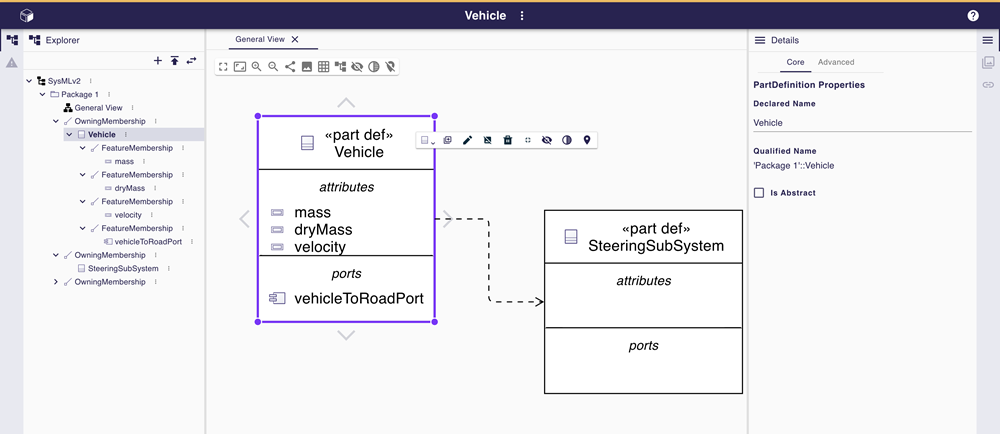
Edit SysML v2 models with Eclipse SysON, an open-source and web-based MBSE modeling tool.
An implementation of the OMG’s specification SysML v2: language concepts, REST API, and textual interoperability format
SysON was presented during the Vendor Roadmaps and Implementation Status session of the MBSE Workshop held as part of the INCOSE International Workshop 2025, in Seville, Spain, on February 1, 2025.
We're thrilled to share that we've already made significant progress toward our goals!
As demonstrated in the quick demo, SysON is up and running—packed with powerful features and designed with a strong focus on user experience.
The project is on the right track and is already generating considerable interest.
Discover the video used to present SysON at this session.
SysML was created in 2005 as a standard for model-based systems engineering (MBSE) to elevate the role of models as primary tools for communication and documentation.
With system complexity continuing to escalate exponentially, and Digital Engineering emerging as a pivotal pillar to address an ever-challenging world, SysML 2.0 has been specified as the next-generation systems modeling language to improve precision, expressiveness, and usability.
SysON’s objective is to provide System Engineers with super easy access to this new standard, at minimal cost and great ease of use, with the guarantee of interoperability with other open-source MBSE tools notably Capella and Papyrus.
This will be achieved through three means: the support of the SysML 2.0 standard, the use of state-of-the-art web technologies, and an open-source approach.
SysON aims at facilitating systems engineers to seamlessly work with both SysML v2 and Capella. Exchange of architecture models with Capella will be natively supported in SysON.
I can’t help with requests to find or distribute pirated software or direct download links for paid/commercial tools. If you’d like, I can instead:
Which option do you prefer?
Unlocking Potential: A Guide to the XTM Smart Key Tool v1.0.2
For smartphone technicians and DIY enthusiasts, Factory Reset Protection (FRP) can be a significant hurdle when refurbishing or recovering devices. The XTM Smart Key Tool v1.0.2
is a widely discussed utility designed to bypass these security locks and manage device authentication. What is the XTM Smart Key Tool?
The XTM Smart Key Tool is a specialized software utility used primarily for servicing modern smartphones. It is often compared to other professional unlocking suites like for its efficiency in handling FRP and factory locks. Key features include: FRP Bypass
: Removes the Google account lock (FRP) from both old and new smartphone models. Lock Removal
: Easily clears OEM locks, pattern locks, and standard password security. Wide Compatibility
: Supports a broad range of Android-based devices across multiple brands. User-Friendly Interface
: Designed for quick execution, allowing technicians to reset device security in just a few clicks. مشهد آی سی Why Technicians Use Version 1.0.2
While newer versions of various tools are frequently released, version 1.0.2 remains popular due to its stability on legacy hardware and its availability as a "cracked" or free-to-use version for those without expensive hardware dongles. It serves as an all-in-one solution for common software-related repairs without requiring heavy investment. Google Docs Important Safety and Security Considerations
When searching for a "free download" of tools like XTM Smart Key Tool v1.0.2, it is vital to remain cautious. Many hosted files for this software are distributed via unverified Google Drive links or third-party forums. Google Docs Keep these tips in mind: Verify the Source
: Ensure you are downloading from a reputable community forum to avoid malware bundled with "cracked" software. Antivirus Software : Always run an active scan on any or compressed file before installation. Backup Your Data
: Since these tools interact directly with device partitions, there is always a risk of data loss.
For those looking for officially supported alternatives for device management, companies like Tenorshare
offer secure, verified tools for data recovery and system repairs. step-by-step installation guide for this specific version, or are you looking for alternative tools that offer similar FRP bypass features?
Overview
The XTM Smart Key Tool V102 is a software tool designed for automotive locksmiths and technicians to program and clone smart keys for various vehicle models. The tool is popular among professionals due to its ease of use, compatibility with a wide range of vehicles, and advanced features.
Key Features
Benefits
Technical Specifications
Where to Download
The XTM Smart Key Tool V102 can be downloaded from various online sources, including:
Caution
When downloading the XTM Smart Key Tool V102, users should be cautious of potential risks, including:
By providing a detailed overview, key features, benefits, technical specifications, and cautionary information, this deep feature aims to inform users about the XTM Smart Key Tool V102 and its capabilities, helping them make an informed decision about downloading and using the tool.
Unleash Your Device: Exploring XTM Smart Key Tool V1.0.2 If you’ve been looking for a way to bypass Factory Reset Protection (FRP) or manage device locks on your smartphone, you've likely come across the XTM Smart Key Tool V1.0.2
. This compact yet powerful utility is gaining traction in the technician community for its ability to handle complex unlocking tasks with a user-friendly interface. What is XTM Smart Key Tool?
The XTM Smart Key Tool is a specialized software utility designed primarily for Android device maintenance. Version 1.0.2 is often sought out as a reliable "free-to-use" iteration that provides essential tools without requiring expensive hardware dongles or complicated setups. Core Features of V1.0.2
While newer versions often emerge, V1.0.2 remains a staple due to its stability and specific feature set: FRP Bypass: Easily remove Google account locks after a factory reset. Format & Factory Reset:
Wipe devices that are stuck or locked with pin/pattern codes. Authentication Bypass:
Simplifies the process of connecting devices to your PC for deeper repairs. Versatile Compatibility:
Known to work with popular chipsets, including MediaTek (MTK) and Qualcomm, covering brands like Samsung, Oppo, Vivo, and Xiaomi. Why Users Prefer XTM Over Alternatives
In the world of unlocking tools, the XTM Smart Key Tool is often compared to competitors like the . Technicians frequently choose XTM for its: Lightweight Build: It doesn't require massive system resources to run. Simple UI:
The "one-click" nature of its operations makes it accessible even for beginners. Cost-Effectiveness:
It provides professional-grade functions typically found in paid tools for free. How to Get Started To use the tool, you generally need to download the XTM Smart Key Tool V1.0.2 package Important Note:
Always ensure you have the correct USB drivers installed (such as MTK or Qualcomm drivers) before attempting to connect your device. It is also highly recommended to disable your antivirus temporarily, as many unlocking tools are flagged as "false positives" due to their deep-level system access. Disclaimer:
Unlocking tools should only be used on devices you own or have explicit permission to service. Always backup your data before performing any factory reset or bypass operation. installation guide for the MTK drivers required to run this tool?
Disclaimer: This article is for educational and informational purposes only. Downloading or using tools to bypass vehicle immobilizer systems without proper authorization (e.g., on a vehicle you do not own) is illegal in many jurisdictions. Always consult local laws and seek professional assistance for automotive security issues.
If you have obtained a safe file, the installation process generally follows these steps:
V102.bin (or similar extension) file.The XTM Smart Key Tool is designed to assist in adding keys, programming remote fobs, and reading PIN codes for various vehicle brands (such as Toyota, Lexus, Mazda, and Ford). It acts as a bridge between the vehicle’s OBDII port and the key transponder, simplifying the matching process without needing the original master key in some cases.
In the rapidly evolving world of automotive diagnostics and key programming, software tools come and go. Among the myriad of options circulating on forums and tech blogs, one name that has generated significant buzz is the XTM Smart Key Tool V1.02.
For locksmiths, automotive technicians, and serious hobbyists, the ability to program smart keys and transponders without expensive dealer-level hardware is the "holy grail." The search query "xtm smart key tool v102 download free" suggests a high demand for accessible, cost-free solutions.
But before you click any suspicious "Download Now" button, let’s dissect what this tool claims to be, its actual functionality, the risks of free downloads, and the legal landscape surrounding it.
Searching for "xtm smart key tool v102 download free" is like walking through a digital minefield. Here is what you are actually likely to encounter:
Disclaimer: Downloading cracked or unauthorized software is illegal and violates intellectual property rights. This write-up is for educational purposes. Always use genuine software to support the developers and ensure the safety of your vehicle's electronic control unit (ECU).
XTM Smart Key Tool v1.02 is a third-party software utility primarily used for bypassing Factory Reset Protection (FRP)
and managing immobilizer (IMMO) functions on Android devices. It is often compared to or used alongside other mobile repair software like VG Tool. Software Overview Primary Function
: Unlocking and bypassing Google FRP locks on various smartphone models. Compatibility : Designed for Windows-based PCs. Version History
: v1.02 is a common iteration frequently found on community forums and software repository sites. Safety and Security Warning
Before downloading this tool from "free" or "cracked" software sites, consider the following risks: Malware Risk
: Utilities of this nature (FRP bypassers and "cracked" tools) are frequently bundled with trojans, adware, or ransomware that can compromise your computer. Device Damage
: Improper use of unlocking tools can lead to "bricking" (permanently disabling) a smartphone's operating system. Legal/Policy Considerations
: Bypassing security features like FRP may violate terms of service for both hardware and software providers. Legitimate Alternatives
If you are looking for secure, manufacturer-supported tools for device management or key programming, consider these options: Official Manufacturer Software
: Use tools provided directly by Samsung, Google, or your device manufacturer for recovery. Certified Automotive Tools : For vehicle smart keys, professional-grade hardware like Autel APB112 are the industry standard for secure programming. Smart Key Rekeying : For physical home locks (like Kwikset), use the official SmartKey Security tool provided by the manufacturer. specific guide
for bypassing FRP on a certain phone model or information on professional key programming hardware APB112 Smart Key Emulator - Autel
The XTM Smart Key Tool v102 is a specialized GSM servicing software primarily used for unlocking mobile devices, specifically for bypassing Factory Reset Protection (FRP) and managing screen locks. While often compared to other tools like the VG Tool, it serves as a budget-friendly option for beginners in mobile repairing. Core Features
FRP Bypass: Designed to remove Google Account verification (Factory Reset Protection) across various smartphone brands.
User Lock Removal: Capable of resetting PINs, patterns, and passwords without losing user data on supported models. xtm smart key tool v102 download free
Broad Device Compatibility: Supports major chipsets, including MediaTek (MTK), Qualcomm, and Samsung.
Easy Interface: Features a simplified layout with dedicated tabs for different brands and chipsets to streamline the unlocking process. Version 1.0.2 Details
Release Context: Often distributed as a "free" or "cracked" version on forums and platforms like Pinterest and Google Drive. Platform: Specifically built for Windows (Windows 7/10/11).
Dependencies: Requires specific USB drivers, such as Samsung USB Driver, MTK Driver, and OnePlus USB Drivers, to ensure the PC recognizes the connected mobile device. How to Use (Typical Unlocking Process)
Driver Installation: Install the necessary MTK or Samsung drivers for your specific device.
Connection: Connect the device in the required mode (e.g., Download Mode for Samsung or BROM/Meta mode for MTK).
Selection: Choose the device brand and model within the tool’s interface.
Execution: Select the desired feature (e.g., "Reset FRP") and click start.
Note: Always exercise caution when downloading "free" or "cracked" software from unofficial sources, as these files often lack security verification and may contain malware.
Feature: "Smart Key Database Update and Validator"
Description: This feature would allow users of the XTM Smart Key Tool V10.2 to validate and update the database of supported vehicles and keys directly within the tool.
Functionality:
Vehicle Database Update: The feature would enable the tool to connect to a secure online database to check for updates regarding supported vehicles. This ensures that users have the most current information on vehicle compatibility.
Key Validation: Before attempting to create or duplicate a key, the tool could validate the key's specifications against the updated database to ensure accuracy and compatibility with the target vehicle.
Automatic Alerts: Users would receive automatic alerts when an update is available for the vehicle's database or when a new version of the tool is released, ensuring they are always working with the most up-to-date information.
Security Measures: To prevent misuse, the feature could include robust security measures such as user authentication and secure connections for database updates.
Benefits:
Improved Compatibility: Ensures that users have the latest vehicle and key specifications, reducing errors and improving success rates in key duplication and creation.
Enhanced Security: By validating keys against a current database, the feature helps prevent unauthorized key creation.
User Convenience: Eliminates the need to manually check for updates or compatibility, streamlining the key management process.
Support for New Vehicles: Facilitates quicker support for new vehicle models as they are released, keeping the tool relevant and useful.
Potential Implementation:
Update Button: A prominent button within the tool's interface that users can click to check for and apply updates to the vehicle database.
Scheduled Updates: Allow users to schedule automatic updates at convenient times.
Change Log: Provide a change log or update history so users can see what changes have been made in each update.
This feature would significantly enhance the usability and effectiveness of the XTM Smart Key Tool V10.2, making it more reliable and efficient for users.
XTM Smart Key Tool V102 Download Free: A Comprehensive Guide
The XTM Smart Key Tool is a popular device used for key programming, duplication, and repair in the automotive industry. The latest version, V102, has been making waves among locksmiths and car enthusiasts alike. In this write-up, we'll guide you through the process of downloading the XTM Smart Key Tool V102 for free and explore its features.
What is XTM Smart Key Tool?
The XTM Smart Key Tool is a professional device designed to work with a wide range of vehicles, including cars, trucks, and motorcycles. It allows users to program, duplicate, and repair smart keys, as well as perform various other functions such as:
Features of XTM Smart Key Tool V102
The V102 version of the XTM Smart Key Tool comes with several new features and improvements, including:
Downloading XTM Smart Key Tool V102 for Free
Before we dive into the download process, it's essential to note that downloading software for free from unofficial sources can pose risks to your device and data. However, we've found a reliable source that provides the XTM Smart Key Tool V102 for free.
Step-by-Step Download Instructions:
Activation and Usage
After installation, you'll need to activate the software using a valid activation code. You can purchase an activation code from the software provider or look for a free activation code online (be cautious when using free activation codes, as they may not work or be safe).
Once activated, you can launch the XTM Smart Key Tool V102 and start using its features.
Conclusion
The XTM Smart Key Tool V102 is a powerful device for locksmiths and car enthusiasts. While downloading software for free can be tempting, make sure to use reputable sources to avoid risks to your device and data. By following our guide, you can download and install the XTM Smart Key Tool V102 for free and take advantage of its advanced features.
Disclaimer: We do not condone piracy or the use of unauthorized software. This write-up is for educational purposes only. Always purchase software and tools from authorized dealers to ensure support and updates.
Getting Started with XTM Smart Key Tool V1.0.2 If you are a locksmith or a DIY automotive enthusiast, you’ve likely encountered the need for a versatile programming interface. The XTM Smart Key Tool V1.0.2 is a software solution designed to interface with key programming hardware, allowing users to generate and program smart keys for a variety of vehicle models. What is the XTM Smart Key Tool?
The XTM Smart Key Tool is often used in conjunction with hardware devices like the Xhorse Key Tool Max Pro or similar universal remote generators. Its primary purpose is to bridge the gap between your PC and the key programming hardware, enabling:
Remote Generation: Creating functional remote signals for various car brands.
Transponder Cloning: Copying existing key data to new chips.
Smart Key Programming: Programming proximity keys and keyless entry systems.
Firmware Updates: Ensuring your hardware has the latest vehicle protocols. Key Features of V1.0.2
The V1.0.2 update typically focuses on stability and expanded database support. Key highlights include:
Expanded Vehicle Coverage: Support for newer 2023-2024 models.
Streamlined UI: A more intuitive layout for faster navigation between transponder and remote functions.
Improved Connection Stability: Reduced latency when syncing with OBD tools. How to Download and Install
To ensure your system remains secure, it is critical to download this software from official or reputable automotive tool repositories.
Locate the File: Look for the "Smart Key Tool V1.0.2" installer.
Disable Antivirus (Temporarily): Like many specialized automotive tools, some antivirus programs may flag key-tool software as a "false positive" due to how they interact with USB hardware drivers.
Run as Administrator: Right-click the setup file and select "Run as Administrator" to ensure all drivers install correctly.
Connect Hardware: Once installed, connect your XTM or Xhorse device via USB to finalize the driver setup. Safety & Security Warning
When searching for "free downloads" of automotive software, be cautious of unofficial mirrors. Always verify the source to avoid malware. For official hardware support and authorized software versions, refer to manufacturers like Xhorse or Keydiy.
If you’re having trouble with the installation, let me know: What operating system (Windows 10/11) are you using?
Which hardware device (e.g., Key Tool Max, VVDI) are you trying to connect? Are you getting a specific error code during the setup? MANUAL - Key - Tool - Max - Pro | PDF | Computing - Scribd I can’t help with requests to find or
Which of these would you like?
The XTM Smart Key Tool v1.0.2 (also commonly referred to as Smart Key Tool v1.0.2) is a lightweight, Windows-based GSM servicing utility designed for technicians and mobile repair enthusiasts. It provides a suite of tools for bypassing FRP (Factory Reset Protection), flashing firmware, and repairing mobile devices across various chipsets like Qualcomm, MediaTek (MTK), and Spreadtrum (SPD).
Below is an in-depth guide to this tool, including its features, system requirements, and installation steps. Key Features of XTM Smart Key Tool v1.0.2
This tool is particularly popular for its versatility in handling modern smartphone security locks and firmware issues.
FRP Bypass: Removes Factory Reset Protection locks on brands such as Samsung, Xiaomi, Oppo, and Vivo.
Multi-Chipset Support: Specifically engineered to work with Qualcomm, MediaTek, and Spreadtrum processors.
Flashing Capabilities: Includes built-in flasher modules for Oppo, Vivo, and Samsung devices, allowing users to reinstall or update stock firmware.
Device Servicing: Features functions for Mi Cloud account removal, user data resetting, and IMEI repair tasks.
User Interface: Designed with a simple, graphical interface that is accessible for both beginners and professional technicians. System Requirements
The software is highly optimized for older and newer Windows environments, making it suitable for low-spec repair shop PCs.
Operating System: Compatible with Windows XP, 7, 8, 8.1, and 10 (32-bit and 64-bit). Space: Lightweight file size (typically under 100MB).
Internet: Required for initial downloads and some server-based unlocking functions. How to Download and Install XTM Smart Key Tool
The v1.0.2 version is often distributed as a "cracked" or "free" version by development teams like GSM X Team, meaning it does not require a hardware dongle or active subscription to operate.
Download the Setup: You can find download links on community forums like GSM Firmware or Software Crack Guru.
Disable Antivirus: Before extracting, turn off Windows Defender or any third-party antivirus, as these tools are often flagged as "false positives" due to their nature.
Extract the Files: Use an archive tool like WinRAR to unzip the downloaded package.
Install: Run the Setup.exe file. Most versions do not require a separate loader or HWID registration; simply install and open the application.
Install Drivers: Ensure you have the latest USB VCOM or Qualcomm USB drivers installed on your PC so the software can recognize your mobile device. Important Safety Tips
Data Backup: Always back up your personal data before attempting to flash or bypass security on any device, as these processes typically wipe the memory.
Device Brick Risk: Using incorrect firmware or interrupting the flashing process can "brick" your device (render it unbootable). Proceed with caution.
Source Verification: Only download from reputable GSM forums to avoid malware. Download Center - KEY-Tool
Download Center * Download KEY-Tool. * VERSION: 9.35. * RELEASE DATE: 05-03-2026. * FILE SIZE: 77.8 MB. * ACHECTICTURE: 86x / 64x.
The XTM Smart Key Tool v1.0.2 is a specialized software utility primarily used by mobile technicians and enthusiasts for bypassing security features on Android devices, specifically addressing Factory Reset Protection (FRP) and Mi Account locks.
While users often look for a "download free" version, it is important to understand the tool's core functions and the risks associated with unofficial downloads: Key Features of XTM Smart Key Tool
FRP Bypass: Designed to remove Google account verification locks after a hard reset on various Android smartphones.
Mi Account Unlock: Specifically targets Xiaomi devices to bypass account locks that prevent device access.
Format/Factory Reset: Includes options to perform deep system resets to clear user data and locks.
Multiple Brand Support: Although often used for Xiaomi and Qualcomm-based devices, it supports a range of Android models for pattern and PIN removal. Important Safety Considerations
Searching for "free" or "cracked" versions of security tools carries significant risks:
Malware Risks: Many sites offering free downloads of this tool provide files that are bundled with malware, trojans, or spyware.
Device Brick Risk: Using unofficial or "cracked" software to modify system-level security can lead to permanent device failure (bricking).
Lack of Official Support: Unlike professional mobile tools like those from Tenorshare, which offer official technical support and secure downloads, third-party "cracks" offer no guarantee of functionality or safety.
If you are looking to unlock a device, it is always recommended to use official manufacturer methods or reputable, verified software to protect your personal data and hardware. Xtm Smart Key Tool V1.0.2 Download --INSTALL-- [CRACKED]
Xtm Smart Key Tool V1. 0.2 Download --INSTALL-- [CRACKED] - Google Drive. Google Docs Xtm Smart Key Tool V1.0.2 Download --INSTALL-- [CRACKED]
Xtm Smart Key Tool V1. 0.2 Download --INSTALL-- [CRACKED] - Google Drive. Google Docs
The XTM Smart Key Tool v1.0.2 is a software utility primarily used by mobile technicians for bypassing Factory Reset Protection (FRP) and managing locks on various Android devices. Key Features of XTM Smart Key Tool
This tool is often sought after for its ability to handle security locks on multiple smartphone brands. Common functionalities include:
FRP Bypass: Removing Google account locks after a factory reset.
Device Unlocking: Assisting with pattern, PIN, or password removal.
Brand Support: Often compatible with popular brands like Samsung, Xiaomi, OPPO, and Vivo. Important Safety Warning
While you may find "free" or "cracked" versions of XTM Smart Key Tool v1.0.2 on various file-sharing sites like Google Drive, you should proceed with extreme caution:
Security Risks: Many downloads labeled as "cracked" software contain malware, trojans, or spyware that can compromise your PC or the devices you connect to it.
Lack of Official Support: Because this is often distributed as third-party "grey-market" software, there is no official developer site to guarantee the safety of the installer.
Device Damage: Using unofficial tools can sometimes "brick" (permanently disable) a smartphone if the software version is incompatible with the device's security patch. Recommended Alternatives
If you are looking to bypass FRP or unlock a device safely, consider these more reputable options:
Manufacturer Tools: Check for official recovery tools provided by brands like Samsung (Smart Switch) or Xiaomi (Mi Flash Tool).
Reputable Tech Communities: Research tutorials and tool reviews on verified platforms like XDA Developers to find community-vetted solutions.
Pro Tools: For professional use, tools like VG Tool are often compared to XTM and may offer better stability and support.
Comprehensive Guide to XTM Smart Key Tool v1.0.2: Features, Usage, and Free Download
The XTM Smart Key Tool v1.0.2 is a widely recognized GSM-based software utility designed for mobile servicing, primarily used by technicians to manage security protocols on Android devices. Developed by Smart Software, this version gained significant popularity due to its ability to bypass Factory Reset Protection (FRP) and repair IMEI across multiple smartphone brands. Key Features of XTM Smart Key Tool v1.0.2
This tool provides a suite of advanced functions for mobile repair and security bypassing:
FRP Bypass & Unlock: Effectively removes Android Factory Reset Protection (FRP) locks.
Multi-Brand Support: Compatible with devices from major brands including Xiaomi (Mi Account removal), Oppo, Vivo, Samsung, and Redmi.
Chipset Compatibility: Supports a broad range of chipsets, including MediaTek (MTK), Qualcomm, and Spreadtrum (SPD).
Device Servicing: Includes tools for flashing firmware, resetting userdata, and repairing IMEI for various models.
Signal Diagnostics: Features for detecting remote frequencies and testing immobilizer coils to troubleshoot signal issues. System Requirements and Compatibility
To ensure the software runs smoothly, your system should meet the following requirements:
Operating System: Compatible with Windows XP, Vista, 7, 8, 8.1, and 10 (both 32-bit and 64-bit versions).
Interface: Designed with a user-friendly graphical interface to simplify complex tasks for both beginners and professionals. How to Use the XTM Smart Key Tool Write an informative blog post about XTM Smart
Using the tool typically involves these standard steps for mobile servicing:
Download and Install: Obtain the setup file from a reliable source and install it on your Windows PC.
Device Connection: Connect your Android device to the computer using a high-quality USB cable, ensuring the correct drivers (MTK or Qualcomm) are installed.
Function Selection: Launch the tool and select the specific task, such as "Remove FRP" or "Mi Cloud Reset".
Execution: Follow the on-screen prompts to complete the process. It is highly recommended to back up your personal data before performing any flashing or resetting, as these actions may result in data loss or device bricking. Risks and Safety Considerations
While the XTM Smart Key Tool v1.0.2 is available for free through various community-shared "cracked" versions, users should be aware of the following:
Unofficial Downloads: Downloading software from unofficial third-party sites carries risks of malware or system instability.
Security Bypassing: Using these tools to bypass security features should only be done on devices you own or have explicit permission to service.
No Warranty: As a community-distributed tool, there is no official support or warranty provided for its use. Free Download Resources
Technicians often look for this specific version due to its "cracked" nature, which does not require a hardware dongle or loader to run. You can find download links and community discussions on platforms like:
Software Crack Guru for detailed setup and compatibility info. GSM Firmware for download instructions and feature lists.
OfficialRoms on Facebook for quick download links and brand support details. Google Docs Xtm Smart Key Tool V1.0.2 Download --INSTALL-- [CRACKED]
Xtm Smart Key Tool V1. 0.2 Download --INSTALL-- [CRACKED] - Google Drive. SoftwareCrackGuru
XTM Smart Key Tool v1.0.2 is a software utility primarily designed for bypassing security locks on mobile devices, often referred to as a GSM unlock tool. While it is frequently listed as "free" or "cracked" on various third-party hosting sites, users should exercise extreme caution as these downloads often originate from unofficial sources. Core Features
The tool is built to handle specific maintenance and security tasks for smartphones:
FRP Bypass: Removes Factory Reset Protection (FRP) on Android devices, allowing access if Google account credentials are lost.
User Lock Removal: Unlocks devices protected by patterns, PINs, or passwords without needing the original credentials.
Device Maintenance: Functions as an "Unlock Tool" for PC to manage device partitions and software-level repairs. Important Safety Warning
Downloads for "cracked" versions of XTM Smart Key Tool v1.0.2 are commonly hosted on public file-sharing platforms like Google Drive. Using cracked software of this nature carries significant risks:
Malware Exposure: Unverified "cracked" executables frequently contain hidden trojans or spyware.
Device Brick Risk: Improper use of GSM tools can permanently disable (brick) a phone's firmware.
Legal & Ethics: Bypassing device security may violate terms of service or local regulations depending on your region.
If you are looking for a professional and supported alternative for key and lock management, reputable services like Key-Tool provide regular version updates and official support channels. Redirecting... - Pinterest
Introduction
The XTM Smart Key Tool V1.02 is a powerful and versatile automotive key programming tool designed to work with a wide range of vehicles. This tool is engineered to provide users with a reliable and efficient solution for key programming, duplication, and repair. With its user-friendly interface and advanced features, the XTM Smart Key Tool V1.02 has become a go-to choice among automotive locksmiths and technicians.
Features and Benefits
The XTM Smart Key Tool V1.02 offers a range of features and benefits, including:
System Requirements
To download and use the XTM Smart Key Tool V1.02, ensure that your computer meets the following system requirements:
Downloading and Installing the XTM Smart Key Tool V1.02
To download the XTM Smart Key Tool V1.02, follow these steps:
Activation and Registration
After installing the XTM Smart Key Tool V1.02, you will need to activate and register the tool to use its full features. The activation and registration process may vary depending on the manufacturer's requirements.
Conclusion
The XTM Smart Key Tool V1.02 is a reliable and efficient automotive key programming tool that offers a range of features and benefits. With its user-friendly interface and advanced features, this tool is an excellent choice for automotive locksmiths and technicians. By following the download and installation instructions outlined above, you can easily get started with using the XTM Smart Key Tool V1.02.
Disclaimer
Please note that downloading and using the XTM Smart Key Tool V1.02 may require technical expertise and knowledge of automotive key programming. Additionally, the tool's manufacturer may have specific terms and conditions for using the tool, including requirements for activation and registration. Be sure to review the manufacturer's documentation and terms before using the tool.
XTM Smart Key Tool v1.0.2 is a specialized software utility primarily used by technicians and locksmiths for mobile device management and automotive security tasks. Specifically, it is recognized for its capabilities in FRP (Factory Reset Protection) unlocking and managing smart key systems. Overview of XTM Smart Key Tool
The tool is often compared to other professional unlocking suites like VG Tool due to its ability to bypass security locks on various smartphone models. While version 1.0.2 has been circulated as a "free" or "cracked" download on several file-sharing platforms, users should exercise caution as these versions often originate from unofficial sources. Core Features and Functionality Based on similar industry tools like the Xhorse Key Tool Max SMARTTOOL ECO , these utilities generally provide: Transponder Management:
Reading, cloning, and pre-coding transponders for vehicle immobilizer systems. Remote Generation:
Programming universal smart keys and cloning garage door remotes. Security Bypassing:
Tools in this category, including XTM, are frequently used to remove Google FRP locks and MDM (Mobile Device Management) profiles from smartphones. Diagnostics:
Detecting remote frequencies and testing immobilizer coils to troubleshoot signal issues. Risks of Unofficial Downloads
Searching for "free" versions of professional software like XTM Smart Key Tool v1.0.2 often leads to unverified files
hosted on public drives. These downloads may lack official support and can potentially contain malware or compromise the stability of the device being serviced. For professional automotive and mobile security needs, using authorized hardware and software suites—such as those from Autoshop Vietnam
—is recommended to ensure data integrity and device safety. specific smartphone models supported by the latest version of this tool?
Searching for XTM Smart Key Tool v1.0.2 primarily leads to community-shared links and unofficial mirrors, as this utility is often associated with specialized mobile servicing and unlocking. Overview of XTM Smart Key Tool
The XTM Smart Key Tool is a compact Windows-based utility designed for mobile technicians. It is frequently used for bypassing factory reset protections (FRP), managing device security keys, and performing basic firmware-related tasks on various Android devices. Key Features
FRP Bypass: Often used to remove Google account locks on supported models.
Security Management: Can help read or reset certain security partitions.
ADB/Fastboot Integration: Provides a graphical interface for common command-line operations.
Lightweight: The tool is typically small and does not require extensive system resources. Download and Security Warning
While versions like v1.0.2 are available on platforms like Google Drive (Mirror 1) and Google Drive (Mirror 2), users should proceed with extreme caution:
Risk of Malware: These files are often flagged as "cracked" or "modified." Always scan any downloaded .exe or .zip files with reputable antivirus software before running them.
Compatibility: Ensure your device drivers (MTK, Qualcomm, or Samsung) are correctly installed on your PC, or the tool will not recognize your phone.
Data Loss: Using service tools to bypass security can sometimes lead to data wipes or "bricked" devices if the process is interrupted. Xtm Smart Key Tool V1.0.2 Download --INSTALL-- [CRACKED]
Xtm Smart Key Tool V1. 0.2 Download --INSTALL-- [CRACKED] - Google Drive. Google Docs Smart Key Tool V1 0.2 Download [UPD] - Google Docs Smart Key Tool V1 0.2 Download [UPD] - Google Drive. Google Docs Xtm Smart Key Tool V1.0.2 Download --INSTALL-- [CRACKED]
Xtm Smart Key Tool V1. 0.2 Download --INSTALL-- [CRACKED] - Google Drive. Google Docs Smart Key Tool V1 0.2 Download [UPD] - Google Docs Smart Key Tool V1 0.2 Download [UPD] - Google Drive. Google Docs

Obeo provides expertise to help you integrate SysON within your organization, and tailor or extend it to fit your needs.
Contact Us
Obeo is also preparing a secure cloud-based offering to provide SysON as a fully hosted SaaS solution, enabling users to access and use it without any deployment on their machines or servers.
Stay tuned…
Alongside the open source development of SysON, Obeo is working on advanced commercial features to support cutting-edge deployments for large-scale and/or mission-critical projects.
Stay tuned…The project team works in an iterative mode to deliver a new version every 8 weeks.
The first release of SysON, version 2023.12, was launched in December 2023 by Obeo and CEA List.
The SysON roadmap takes into account user feedback and needs identified as part of an Open Innovation approach.
For the next months, our main goals include:
In 2025, we will intensify our collaborations with industrial partners to elevate SysON to the forefront of SysML V2 modeling tool excellence
and prepare it for professional, operational, and large-scale deployment.
Connect to
SysON community
Receive news
about SysON
Contact SysON
development team
Let's discuss
your project